How does tab switching detection work?
Tab-switch detection runs in the browser, watching for the exam window losing focus. What gets logged, and why one switch rarely means much on its own.
In short
Focus and blur events, fullscreen enforcement and timestamped logs, and why reviewers look for patterns rather than single events.
Tab switching detection works by using standard web browser APIs, mainly the Page Visibility API and window focus/blur events, that fire automatically the moment your exam tab stops being the active window, whether you clicked to a new tab, alt-tabbed to another app, or minimized the browser. The browser itself is reporting this, not something proctoring software has to guess at or infer indirectly.
That's the mechanism behind a basic quiz on Canvas or Moodle. Dedicated proctoring software goes a layer deeper, watching at the operating system level rather than just the browser. This article covers both, plus what tab-switch detection actually catches and what it doesn't. For the full picture of how proctoring works overall, see our complete guide to online exam proctoring.
The Core Mechanism: Browser Visibility and Focus Events
Every modern web browser exposes a built-in way for a webpage to know whether it's currently visible to the user. Proctoring tools and exam platforms simply listen for that signal.
- Page Visibility API - the moment your exam tab is switched away from, minimized, or your screen is locked, the page's state changes to "hidden," and the exam page detects that change instantly
- Focus and blur events - these fire when the entire browser window gains or loses focus, which covers alt-tabbing to a different application, not just switching tabs within the same browser
- Timestamped logging - every detected event is recorded with exactly when it happened and, in many systems, how long the student was away before returning
This is a recognized web standard, not a proprietary trick - it's the same technology a video-streaming site might use to pause a video when you switch tabs. Exam platforms are just repurposing it for integrity monitoring.
Browser-Level Detection vs. OS-Level Detection
Not all tab-switch detection is equally thorough, and the difference matters if you're evaluating a platform or trying to understand what a specific exam will actually catch.
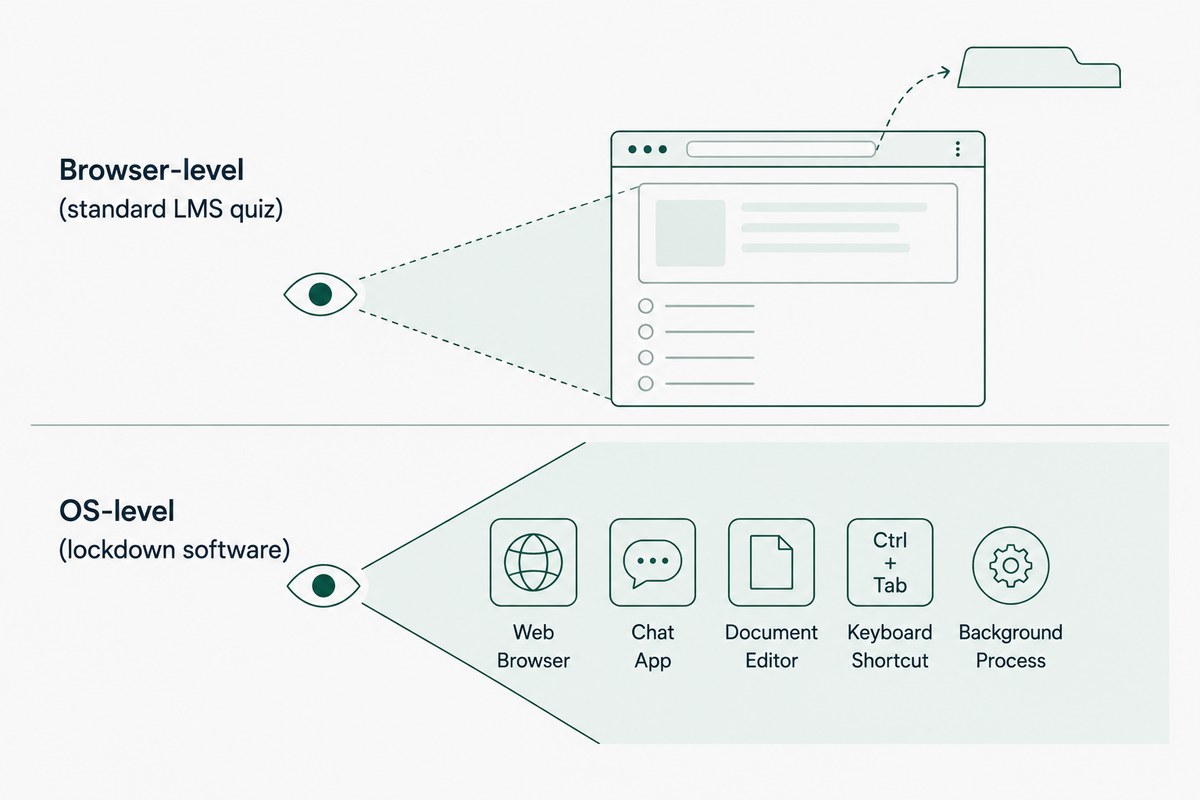
Standard LMS quizzes (a basic Canvas or Moodle quiz with no dedicated proctoring add-on) typically rely only on browser-level events. They can tell that you left the tab, but they generally can't see what you did once you left it.
Dedicated proctoring software (Respondus LockDown Browser, Honorlock, Proctorio, and similar tools) installs with higher system permissions and monitors at the operating system level, not just inside the browser. This means it can detect:
- Alt-tabbing to any other application, not just browser tabs
- Background processes running during the exam, like a messaging app or an open PDF
- Attempts to switch windows using keyboard shortcuts
The practical difference: a browser-only quiz knows you left, but true lockdown software often prevents you from leaving at all, or at minimum sees far more about where you went.
Full-Screen Enforcement Takes This a Step Further
Many proctoring platforms require the exam to run in full-screen mode specifically because it makes tab and window switching much easier to detect and, in some cases, block outright.
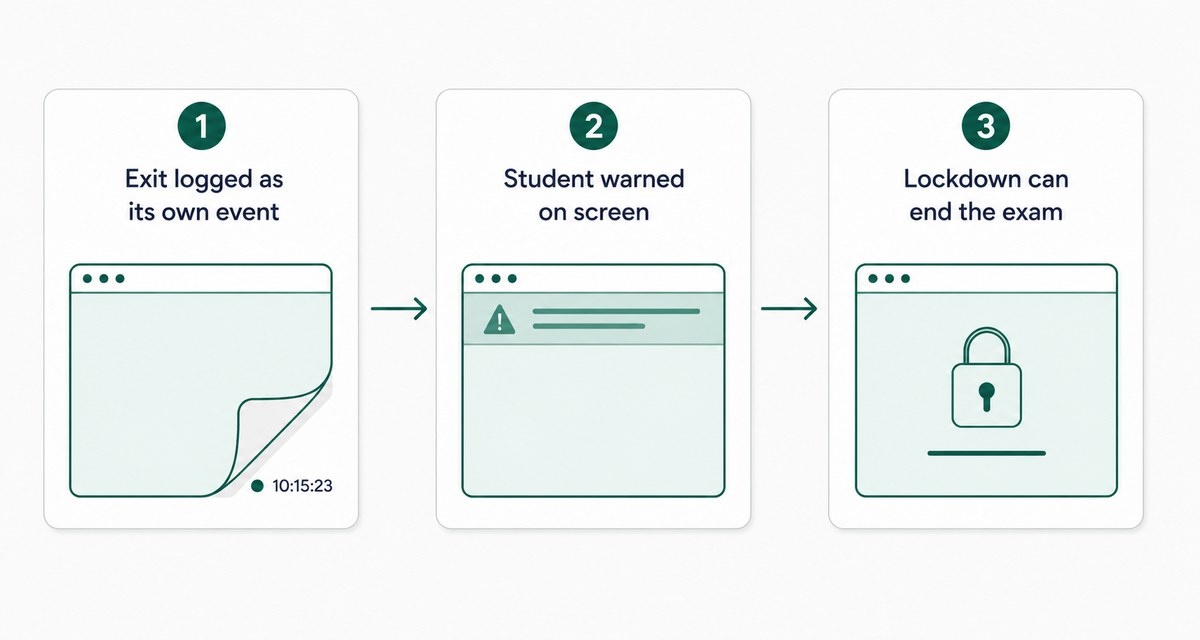
- Exiting full-screen mode is itself logged as an event, separate from a tab switch
- Some systems immediately alert the student on-screen the moment full-screen mode is exited
- Lockdown browsers can prevent exiting full-screen entirely, or automatically end the exam session if it happens
This is closely related to how systems handle a second connected monitor - both rely on the same underlying focus and display-monitoring layer, just triggered by different actions. For that specific mechanism, see How Do Online Exams Detect Multiple Screens?
What Gets Logged When a Tab Switch Happens
A single tab switch produces more data than just "yes/no, it happened." Most systems capture:
- Timestamp of exactly when the switch occurred
- Duration - how long the student was away from the exam tab before returning
- Frequency - how many times it happened across the full exam session
- Correlation with question timing - whether switches cluster around specific, harder questions, which is often more telling than the raw count
A single short switch rarely triggers a serious consequence on its own. What reviewers actually look for is a pattern - repeated switches, especially ones that line up with difficult questions, tell a very different story than one brief switch early in the exam.
What Tab Switching Detection Misses
It's worth being direct about the limits here rather than presenting this as airtight.
- A second device outside camera view - if a student searches for answers on a phone that's never visible in the webcam frame, tab-switch detection on the computer won't catch it
- Split-screen or overlay tricks on some operating systems can, in certain configurations, avoid triggering a full focus-loss event, though lockdown software has increasingly closed this gap
- Browser-only quizzes with no lockdown can be bypassed more easily than dedicated proctoring software, since there's no enforcement layer preventing the switch in the first place, only a log of it happening
This is exactly why tab-switch detection is treated as one signal among several, webcam monitoring, audio detection, and browser lockdown, rather than a complete integrity solution on its own. For the fuller detection picture, read How Does AI Proctoring Detect Cheating?
Why This Matters for Fairness, Not Just Enforcement
Tab-switch data isn't only used to review integrity risks - reviewed in aggregate, it can also flag problems with the exam itself. If a large share of students switch away from the exam right at the same question, that's often a sign the question is ambiguous or poorly worded, not that an entire class attempted to cheat simultaneously. Question-level analytics (TunnelQuiz has them on Pro) help here, so instructors can revise a confusing question rather than only using the data to flag individual students.
The Short Version
Tab switching detection relies on standard browser signals, mainly the Page Visibility API and focus/blur events, that fire the instant your exam tab loses focus, whether from switching tabs, alt-tabbing, or minimizing the window. Dedicated proctoring software extends this to the operating system level for much deeper detection, though no method is airtight on its own, which is why it's paired with other monitoring layers.
Frequently asked questions
Does switching tabs once automatically flag you for cheating?
No, a single, brief tab switch is typically logged but rarely triggers a serious consequence on its own. Reviewers generally look for repeated switching or patterns that correlate with specific questions before treating it as a genuine concern.
Can tab switching be detected without installing special software?
Yes, to a degree, the Page Visibility API and focus/blur events are built into every standard web browser, so even a basic quiz platform can detect when you leave the tab. Dedicated proctoring software adds deeper, operating-system-level detection beyond what the browser alone can see.
Does alt-tabbing to another application get detected the same way as switching browser tabs?
With dedicated proctoring software, generally yes - these tools monitor window focus at the operating system level, which covers switching to any application, not just other browser tabs. Basic browser-only quizzes may only detect switches within the browser itself.
Can tab switching detection be bypassed?
Basic browser-level detection can sometimes be avoided through certain technical workarounds, though dedicated lockdown software has closed most of these gaps by monitoring at the OS level and enforcing full-screen mode. No detection method is perfect, which is why it's typically combined with webcam and audio monitoring rather than used alone.
Why does full-screen mode matter for tab switching detection?
Full-screen enforcement makes it much easier to detect when a student exits the exam environment, since leaving full-screen mode is itself logged as a distinct event. Some lockdown browsers go further and prevent exiting full-screen at all during the exam.